 ADHDNotes
01
Write and read side by side
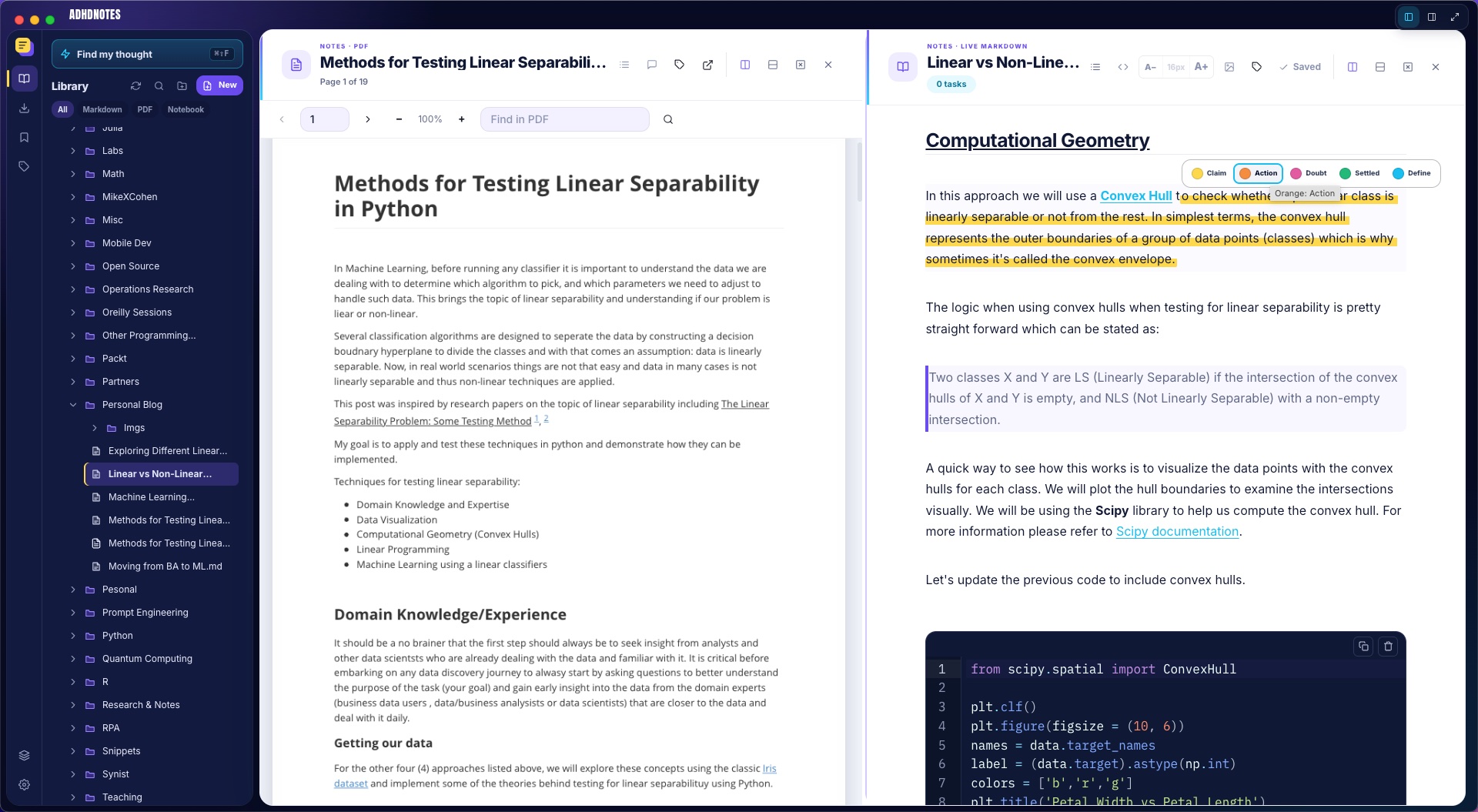
Live Markdown, research PDFs, and read-only Jupyter notebooks share one Library and a focused side-by-side workspace.
Free local-first research workspace
Write in Markdown. Read PDFs and notebooks. Capture the web. Plan the day. Then find the exact idea again—even when you only remember what it meant.

.md files in folders you chooseone connected research loop
ADHDNotes connects the work that usually gets scattered across a Markdown editor, a PDF reader, browser tabs, a task app, and a calendar.
Live Markdown, research PDFs, and read-only Jupyter notebooks share one Library and a focused side-by-side workspace.
Claim, Action, Doubt, Settled, and Define are reasons—not decorative colours.
Fast word matching finds precise hits. Private similarity search adds passages that express the same idea differently.
MeaningPlan backwards from a deadline and let unfinished tasks face a decision instead of fading into the backlog.
research areas
Create an Area for a thesis, course, client, or question. Link the Notes, PDFs, notebooks, Marks, and Snips that matter without moving, duplicating, or reorganizing the originals.
A paper, the note it inspired, a notebook experiment, and a passage from the web can sit in one working set.
Open an item in place, keep the rest of the research visible, and return to the next source without retracing your steps.
Switch between Cards, List, and Graph. Expand a shared item to reveal the other Areas it connects—only relationships you chose, never invented ones.
Start with Inbox, Favorites, Reading, Research, and Reference—or create your own. A preparation runway can become an Area too, carrying the work beyond the date it began with.
the annotations workspace
Highlight a line in a note, mark a PDF page, capture a passage from the web, or annotate a notebook’s Markdown cell. Every mark appears in one place and still knows exactly where home is.
It is not the syntax; plenty of editors have highlights. The difference is the shared cognitive system: every mark becomes a typed, retrievable object, whether it began in a note, a PDF, a notebook, a full-page Mark, or a selected Snip.
Markdown marks stay readable in your files. PDF and notebook annotations stay privately on your device, while ADHDNotes leaves the originals untouched.

Meaning is visible while you write, then every mark remains available from the shared Annotations workspace.
Origin
Group by
the hand-off
This is the part that is hard to describe and easy to see. Write the note; the highlight and the callout become entries you can find later, without you filing anything.
The scale factor is about variance, not size.
Highlight · Settled
a probability distribution over positions
attention.md
Callout · Aha moment
The scale factor is about variance, not size.
attention.md
Highlight · Settled
Masking adds negative infinity before the softmax, never after.
sequence-models-lecture-07.pdf · p.4
Callout · Aha moment
Heads are concatenated and projected, not averaged.
Saved page · attention-lab.example.com
The two marks made in the note join a highlight taken from a PDF page and a callout added to a saved web page. Same catalog, four different origins, each one still pointing back to where it came from.
the shared vocabulary
Colour tells you why a passage mattered—a claim, an action, a doubt—while callouts give different kinds of thinking a consistent shape. It all remains plain Markdown.
Five colours, five reasons to mark something. Select one to see how it reads as Markdown and how it renders.
Attention lets every token ==look directly at== every other token, not just its neighbours.Attention lets every token look directly at every other token, not just its neighbours.
==o:Rewrite the introduction before Thursday.==Rewrite the introduction before Thursday.
Is this ==p:actually true for sparse attention==, or only for the dense case?Is this actually true for sparse attention, or only for the dense case?
==g:Softmax turns the raw scores into a probability distribution.==Softmax turns the raw scores into a probability distribution.
A ==b:key== is the vector a query is compared against.A key is the vector a query is compared against.
| Syntax | Meaning | Colour |
|---|---|---|
| ==text== | Claim | #FFD84D |
| ==o:text== | Action | #F48D40 |
| ==p:text== | Doubt | #E25BA0 |
| ==g:text== | Settled | #22B979 |
| ==b:text== | Define | #12BFEF |
Twelve blockquote tokens for the twelve reasons you stop mid-read. Select one to see how it actually renders. A callout is not just a syntax token; it is a coloured card with its own icon.
Freeze the shuffle before the sweep, not after the first surprising result.
The evaluation drop was a tokenizer mismatch, not the model. Two days lost to a hash nobody logged.
Heads are concatenated, then projected once. The projection is not optional — it is what lets heads interact.
Come back to the interaction between BPE dropout and low-resource languages. Parked mid-paragraph; the argument did not close.
Divide the dot products by the square root of the key dimension, or softmax saturates as that dimension grows.
tokenize("unbelievable") -> ["un", "belie", "vable"] # 3 pieces, not 1
Log the tokenizer hash alongside the model hash. A mismatch is invisible in the metrics until it is very expensive.
Write the next concrete step before you stop. A useful return point should survive the distance between two work sessions.
Does the same argument hold for the multi-query variants, where keys are shared across heads?
Be able to derive the scaling factor from the variance of a dot product of two independent unit-variance vectors.
Byte-level and word-piece vocabularies are not interchangeable, even at the same vocabulary size.
Transformers qualifying exam — dry run
> [!NOTE]
An ordinary observation worth keeping.
> [!AHA]
The moment it clicked, marked so you can find it in six weeks.
> [!REMEMBER]
The thing you will otherwise forget.
> [!REF]
An unfinished thought, deliberately parked.
> [!DEF]
A term pinned down once, in your own words.
> [!EXAMPLE]
The concrete case that makes the abstract one land.
> [!TIP]
Something that will save you time next time.
> [!IMPORTANT]
Do not skim past this one.
> [!QUESTION]
Something you do not understand yet, stated plainly.
> [!EXAM]
Likely to be assessed. Findable the night before.
> [!WARNING]
The trap you already fell into once.
> [!PREP]
Seeded automatically across the days before a date.
These are ordinary Markdown blockquotes and ordinary ==text== highlights. Nothing is proprietary, and nothing is lost when you open the file in another editor.
forced daily migration
Every task you did not finish comes back the next morning. It blocks the app, one task at a time, until you decide what happens to it.
There is no dismiss button. There is no snooze. There is no quiet way to let a task age out of view. You either move it to today or admit it was never important. You decide before you write anything else.
Each morning, unfinished work returns for a clear decision. ADHDNotes adds this friction deliberately, because a task that never has to be answered for is a task that quietly disappears.
Review Previous Tasks
From August 25, 2026 → August 26, 2026
Finish the §4 discussion draft
preparation runways
Choose an important date and how much preparation time it deserves. ADHDNotes turns the days before it into a visible runway, with the next step waiting in each daily note.
Finish early, move the target, or extend the runway as plans change. The whole span stays visible on the day map, with an Area ready to hold the material behind the work.
Finish ahead of schedule and close the runway without waiting for the date.
The runway carries the work forward until the target day arrives.
Shift the target and the preparation plan moves with it.
Extend the runway when the work needs more time.
Start from a calendar date, an event, or the note already in front of you. The runway stays connected to the reason you created it.
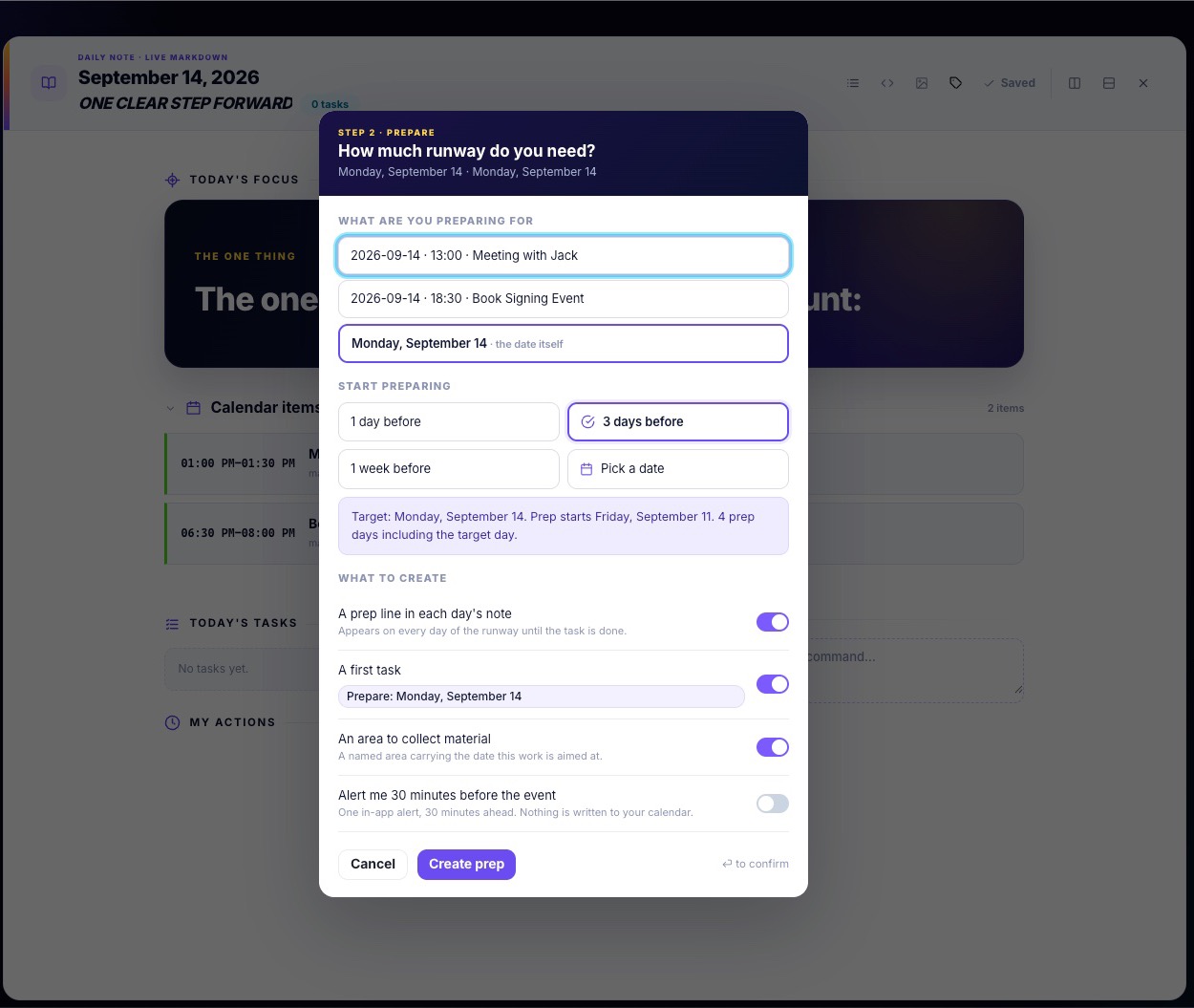
Choose the target. ADHDNotes builds the runway between now and then.
one library, several formats
Point ADHDNotes at folders you already own. Markdown files, PDFs, and Jupyter notebooks appear in one Library without a vault migration, bulk import, or format conversion.
Switch among All, Markdown, PDF, and Notebook lenses. PDFs open with page navigation, outline, zoom, annotations, and find-with-highlight. Jupyter .ipynb files open in a polished read-only cell reader with outline, in-notebook find, and cell-anchored search results.
Highlights and callouts work on PDF pages just as they do in notes. ADHDNotes keeps your annotations close while leaving the original PDF untouched.
Read a paper beside the note it is shaping. The source files remain untouched.
find my thought
Find My Thought searches Markdown notes, PDF pages, notebook cells, Marks, and Snips. Exact words appear instantly, then private similarity search finds relevant passages that use different language.
Try a phrase below and watch the research narrow. Clear it to see the complete set again.
Search begins with the wording you remember, then widens to related ideas. Results found by similarity carry a clear Meaning badge. Open any result at its heading, PDF page, notebook cell, or original capture. Your queries and source text stay on your machine.
Source
Resource
focus-recovery.md
~/research/focus-recovery.md
Leave one visible restart point before stopping, so returning to unfinished work does not require rebuilding the whole context.
attention-notes.md
~/research/attention-notes.md
Returning becomes easier when the next meaningful step is already written down before the current session ends.
Interruptions and working memory
Mark · research-workflow.example.com
The cost of an interruption is often paid when work resumes, because the unfinished context has to be reconstructed.
Designing for task resumption
Snip · attention-lab.example.com
A concrete next action reduces the effort required to re-enter a complex task after time away.
Cognitive Load Review
cognitive-load-review.pdf · p.18
External cues can preserve enough context to shorten the time needed to resume demanding work.
focus-timing.ipynb
focus-timing.ipynb · cell 12
Sessions with a written restart point returned to productive work sooner than sessions without one.
your day
The daily note opens on Focus: the handful of things that matter right now. Alongside it are a read-only view of your calendar, a day map of where the hours actually went, and tasks that carry their own age so an item cannot sit quietly for a month.
A short, deliberately small list at the top of the day. Not everything on your plate, just what today is for.
Outlook and macOS events show up in the day, in their hour, colour-coded by account. Nothing is ever written back to the provider.
A task that has been open for a week says so. Age is visible, not something you have to go looking for.
Timed blocks with a start time and a duration, distinct from the task list, for the things that need an actual slot in the day.
Calendar events, My Actions, and preparation runways laid out against the clock, so the shape of the day is visible at a glance.
A lead time attached to a timed action, so it can nudge you before the slot arrives rather than the moment it starts.
Priority, recurrence, and timed actions stay visible in the note itself:
* [ ] !HIGH Send the licence question
* [ ] @weekly:monday Plan the week
+ [ ] 09:00 [90m] Deep work
Your daily plan remains readable Markdown—even outside ADHDNotes.
from date to action
The day map is more than a miniature calendar: each date opens the note for that day, starts a preparation runway, or adds a timed action without sending you through another planning app.
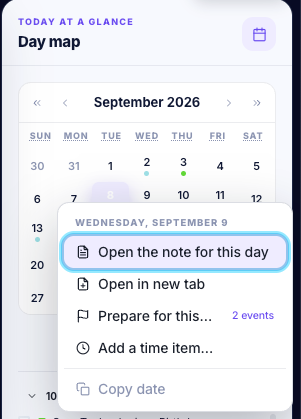
The current Day map, without leaving the workspace.
browser extensions
Save a whole page as a Mark or select only the passage you need as a Snip. Chrome and Firefox install from their stores. Safari uses a small companion app — download it, open it once, then turn the extension on in Safari Settings.
 Available nowChromeGet it from the Chrome Web Store
 Available nowFirefoxGet it from Firefox Add-ons
 Available nowSafariDownload the Mac companion app
Browser names and logos are trademarks of their respective owners. ADHDNotes is not affiliated with or endorsed by Google, Mozilla, or Apple.
Saving a web page is only useful if you can work with it later. In ADHDNotes, the page joins the same reading, marking, and finding loop as everything you wrote yourself.
A page you clip becomes an editable Live Markdown document. Add the same highlights and callouts you use in notes, find it later by words or meaning, and return to the untouched capture with Revert to original capture.
Your capture goes straight to ADHDNotes on your computer—no hosted capture account in the middle.

A saved page becomes editable Live Markdown while its pristine capture remains recoverable.
local-first by design
Markdown stays ordinary Markdown in folders you choose. PDF and notebook originals are never rewritten. Everything ADHDNotes needs to remember stays locally on your device and serves your files—not the other way around.
==g:settled claim==
+ [ ] 09:00 Deep work
[[Aug 16 · Reading group]]
Open the same file in any Markdown editor and the important parts still make sense: highlights remain highlights, tasks remain tasks, and links remain links. PDF and notebook annotations stay private on your device while their original documents remain untouched.
Your notes are files, and they outlive the app.
what’s next
ADHDNotes is growing beyond the formats it supports today—while keeping the same calm, local-first workspace.
Word documents
Bring .docx research documents into the same Library, so they can be read, searched, and annotated alongside the rest of your work.
Read Marimo, R Markdown, and Quarto beside the notes and papers they belong with.
Move from reading notebooks to running cells and exploring results without leaving your research workspace.
Optional local assistance for summarizing, rewriting, and working through ideas—while keeping the core app useful without AI.
Bring more calendars into the day view, including Google, Yahoo, iCloud, and CalDAV.
get adhdnotes
No subscription, no account, and no hosted sync service. Get ADHDNotes for Windows from the Microsoft Store, or download the Mac app for Apple Silicon.
ADHDNotes 1.0.2 for macOS 13 or later on Apple Silicon. Open the disk image and drag the app to Applications.
Download for MacADHDNotes for Windows 11, delivered through the Microsoft Store.
Get it from Microsoft StoreChrome, Firefox, and Safari clippers are available now. Safari is a separate companion app, not part of the ADHDNotes Mac download.